
How to pay for White VPN
Pay for White VPN with Telegram Stars in the bot, or by bank card and Russia’s Faster Payments System (SBP) on Tribute’s external payment page. Choose your preferred option and follow the steps below.
What is the product storefront? #
It is a page listing White VPN purchases. Each white card with a name and price is a link. Click the card you need to open checkout. You do not need to register on the White VPN website.
Choose the right product #
- Need a subscription? Choose a product with a duration, such as “White VPN — 30 days”. Check the period and description before buying.
- Want to add money to your White VPN balance? Choose “Balance top-up” and an amount. This credits your internal balance; it does not by itself buy a new subscription period. If you have a saved order, the bot may complete it automatically.
- Running low on data? “Extra 50 GB”, “Extra 100 GB” and “Extra 250 GB” add data to an existing subscription. They do not replace a subscription purchase.
Pay by card or SBP in your browser #
Open the storefront
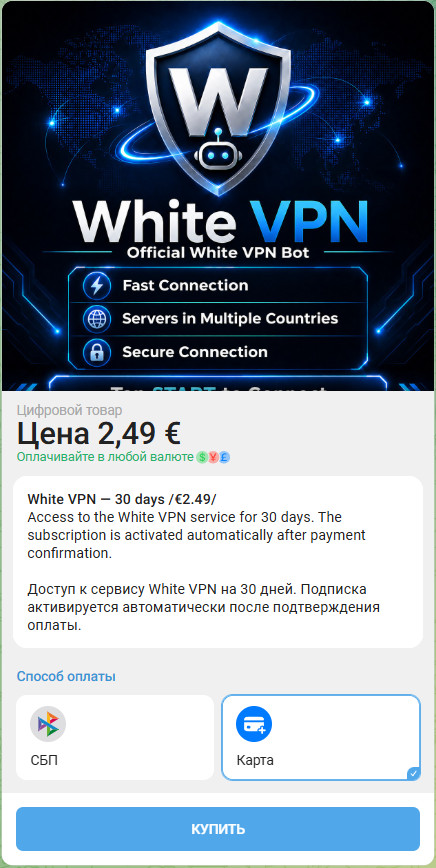
Click “Choose a subscription or top-up” to open web.tribute.tg. Scroll through the list and click the product you need.
Check the product
Check the duration, price and purpose of your purchase. Select Card (Карта) or SBP (СБП), then click Buy (Купить). On a phone, scroll down if the button is below the visible area.
Sign in when Tribute asks
Choose Telegram or email. For an existing subscription, use the same linked account. Use your own email address. If you sign in by email, enter the code from the email.
Complete the payment
For cards, follow the payment form and select your bank’s country if asked. For SBP, follow the link to your banking app or scan the QR code. Check the final amount and currency before confirming. Available methods depend on the bank and country.
Get access
After payment confirmation, follow Tribute’s instructions. If you buy using email, open the activation email and follow its link. The sign-in code and activation link are separate steps. Check your spam folder. Open the White VPN bot to manage your subscription.
Telegram Stars in the bot #
Open the official bot and select a subscription, data, devices or a balance top-up. Choose Telegram Stars, check the number of Stars on the invoice and confirm payment. If needed, buy more Stars using an option available in Telegram. The current calculation is shown in the bot before payment.
Open the White VPN botActivation and balance credit #
A duration product provides the selected subscription; Balance top-up credits your internal balance; Extra GB adds data to an existing subscription. These are different purchases. Use the Telegram account or email linked to the intended subscription. If you paid with another account, contact support.
Important: if you buy using email, open the email and follow the activation link. For an existing subscription, use the account already linked to it.
If something goes wrong #
Charged, but no access?
Do not pay again. Check your email, spam folder and activation link, then your account in the bot. If access is still missing, send support your payment confirmation and product name. Do not send card numbers, CVV or banking codes.
The White VPN website will not open
You can open the Tribute storefront directly using the link below. You do not need to visit the White VPN website first.
Where are my subscription and support?
Open the official White VPN bot. The storefront also has a “VPN Subscription / Подписка” link at the bottom. The bot provides subscription management and support.
support@white-vpn.net
Updated 19 November 2026